

When workers are safe and comfortable, every process goes more smoothly. Company turnover also decreases, the business can retain more of their best workers, and overall productivity increases. One of the best ways to keep employees happy is to make the machines they use safe and comfortable. With this in mind, let’s take a look at a few ergonomic factory press features to improve operator safety and comfort.
13 Ergonomic Factory Press Features for Operator Safety and Comfort
In short, ergonomics is about designing a process or product to most comfortably fit a person. In manufacturing, ergonomic design usually involves making machines and equipment that better fits a person’s use, especially for repetitive tasks. This might be as simple as making controls easier to press or maneuver, or it might be more complex, like placing safety barriers in specific areas. There are many ways to make presses safer and easier to use.
1. Two-Hand and Anti-Repeat Controls
Two-hand controls require operators to use both hands simultaneously to engage the press, preventing them from accidentally starting the machine with one hand in the danger zone. Anti-repeat controls ensure that the machine doesn’t cycle more than once with a single trigger, reducing the risk of unexpected, repeated operation. Though using both hands for the operation requires slightly more effort on the part of the operator, this press feature can also significantly improve safety.
Two-hand controls come standard with most AHI presses. View our selection of pneumatic, hydraulic and air-over-oil presses for production and assembly applications ›
2. Adjustable Workstations and Press Height
Adjustable press workstations allow operators to change the press height and angle, adapting the station to individual needs or task requirements. Height-adjustable features can be manual or motorized, letting operators raise or lower the press easily. This is a simple, but impactful ergonomic factory press feature that can significantly improve the comfort of repetitive press tasks.
With adjustable height, operators can set the workstation to an optimal level to prevent repetitive strain injuries, improving posture and comfort. Since repetitive strain injuries are common in manufacturing environments, interventions like these can be significant. This feature is particularly useful in facilities with multiple users, allowing each operator to customize the press height to reduce strain.
3. Foot Pedal Controls
Foot pedal controls allow operators to activate the press using a foot pedal rather than a hand lever or button. The pedals can be shielded or require a specific sequence to engage, adding a layer of safety to prevent unintentional activation. This frees up the operator’s hands for better control over parts or materials, enhancing comfort and reducing repetitive hand motions. Foot pedals also make it easier to position materials accurately, improving precision and efficiency.
Note: Foot pedal controls require additional machine safety measures, such as light curtains and/or barrier guarding, to protect the operator from pinch points during the press cycle.
4. Light Curtains and Safety Sensors
Light curtains are safety sensors that project beams of light across the entrance of the press. If the beams are obstructed during the press cycle, the press faults and is put into a safety condition. This system is a non-intrusive way to keep the operator safe without the need for cumbersome physical barriers. Since it doesn’t create a physical barrier, light curtains can also be easier to install, without the need to rearrange other equipment.
Air-Hydraulics offers a variety of custom guarding options for all of our industrial presses. View examples of presses with light curtains, solid guarding, interlocking doors, and more or request a quote on a custom press package today
5. Ergonomic Grips and Handles
When using controls or levers over and over again, the comfortability of the handle makes a big difference. Ergonomic grips and handles on levers or control knobs improve the operator’s grip and reduce hand fatigue. These grips may be padded, contoured, and made from materials that reduce vibration transfer to the hands.
With better grip design, operators can maintain control and perform repeated motions with less strain. These grips also help minimize vibrations, which can be especially important when working with presses that produce continuous, high-impact movements.
6. Automatic Part Ejection Systems
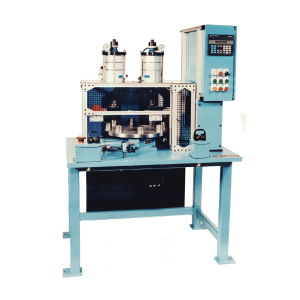 Automatic part ejectors like the mechanism featured in this dual station indexing press machine remove finished pieces from the press after each cycle, freeing the operator from having to reach in to retrieve parts. These systems often work in tandem with sensors or timers, and they can include conveyor belts or simple push mechanisms.
By eliminating the need for operators to reach into the press to retrieve parts, automatic part ejectors reduce hazards and also speed up the process. This improves productivity by allowing a seamless workflow while prioritizing operator safety.
(left:) 2 Ton Dual Station Crimping Press Indexing Machine with Air Blow-Off Eject Feature
7. Noise-Reducing Enclosures
Noise-reducing enclosures or sound barriers are designed to encase the press partially or completely, absorbing sound and reducing the noise level around the machine. These enclosures can be customized to fit specific press sizes and production requirements.
Hydraulic presses, in particular, generate a high level of noise. High noise levels in manufacturing environments can lead to hearing loss and fatigue, impacting operator well-being. Noise-reducing enclosures make for a quieter, more comfortable work environment, allowing operators to concentrate better and reducing the need for hearing protection.
8. Vibration-Damping Mounts and Pads
Heavy equipment produces heavy vibrations which can make it difficult to complete even simple tasks, especially when they are done over and over again. Vibration-damping mounts and pads absorb the vibrations generated by the press, reducing the amount transferred to the surrounding area and operator. These mounts are typically made from rubber, polyurethane, or other materials that dampen vibration.
By minimizing vibrations, these mounts make the press more comfortable to operate and reduce strain. They also help prevent the gradual loosening of press components, making regular press maintenance easier, prolonging the machine’s lifespan and improving precision.
9. Operator-Friendly Control Panels
Modern control panels with touchscreen interfaces or simplified button layouts allow operators to set parameters, check diagnostics, and control press cycles easily. These panels can be positioned at eye level and include clear labeling to improve accessibility and usability.
User-friendly control panels reduce the cognitive load on operators, making it easier for them to set up and monitor the press. This improves efficiency and reduces errors, creating a more comfortable and intuitive work experience. When the controls are simple and intuitive, it’s also easier to train new operators and prevent mistakes.
10. Task Lighting and Indicators
Proper task lighting and visual indicators, such as LED lights around the workspace, improve visibility for operators. Some systems also include colored indicators to signal machine status, like green for ready, yellow for caution, red for error.
Enhanced lighting makes it easier for operators to see what they’re working on, reducing eye strain and improving accuracy. Visual indicators make it immediately clear whether the press is safe to operate, improving safety and reducing errors.
11. Quick-Change Tooling Systems
Quick-change tooling systems allow operators to swap out dies and tools on the press rapidly without requiring complex adjustments. These systems often use slide-in, clamp, or magnetic setups to hold tools securely but make changing fast.
Quick-change systems save time and reduce the physical effort required to adjust the press for different tasks. This is particularly helpful in small-batch production with frequent changeovers, enabling operators to remain productive without repetitive tool adjustments.
12. Press Speed Controls and Soft Start/Stop
Speed controls and soft start/stop functions allow operators to adjust the press speed based on the specific task, enabling a gradual increase or decrease in speed. Soft start and stop features reduce jarring movements at the beginning or end of each cycle. This can be especially helpful when working with tight tolerances or delicate components.
These features help operators handle materials with greater precision and reduce the impact of sudden movements, which can lead to strain or errors. This flexibility improves the user’s control over the machine, making the press more adaptable and reducing fatigue.
13. Press Monitoring and Feedback Systems
 Monitoring systems collect data on press performance, including cycle counts, force applied, and maintenance needs, often displaying it in real-time on a screen. This might include press force monitoring, press distance monitoring, or a combination of the two. Some systems include feedback mechanisms that alert operators when adjustments are necessary.
Force and distance monitoring also removes the necessity for the operator to manually gauge each part for quality inspection, increasing efficiency and reducing operator strain.
(Right:) 2.5 Ton Force & Distance Monitoring Press Configured for Error-Proof Assembly
Real-time feedback allows operators to track performance, anticipate maintenance, and make adjustments before issues arise, preventing downtime. Operators can work with confidence, knowing that the machine is operating optimally, and reduce strain from unexpected malfunctions.
Of course, it’s not essential to utilize all of these ergonomic factory press features to improve operator safety and comfort. However, if a particular process or task is causing workplace injuries or strains, high turnover, or complaints, these solutions might help to address them. If you’re looking to replace your factory presses with models customized to suit your needs, we can help. Contact us today to learn more about our hydraulic, pneumatic, or hydropneumatic presses, and the many features available with them.